


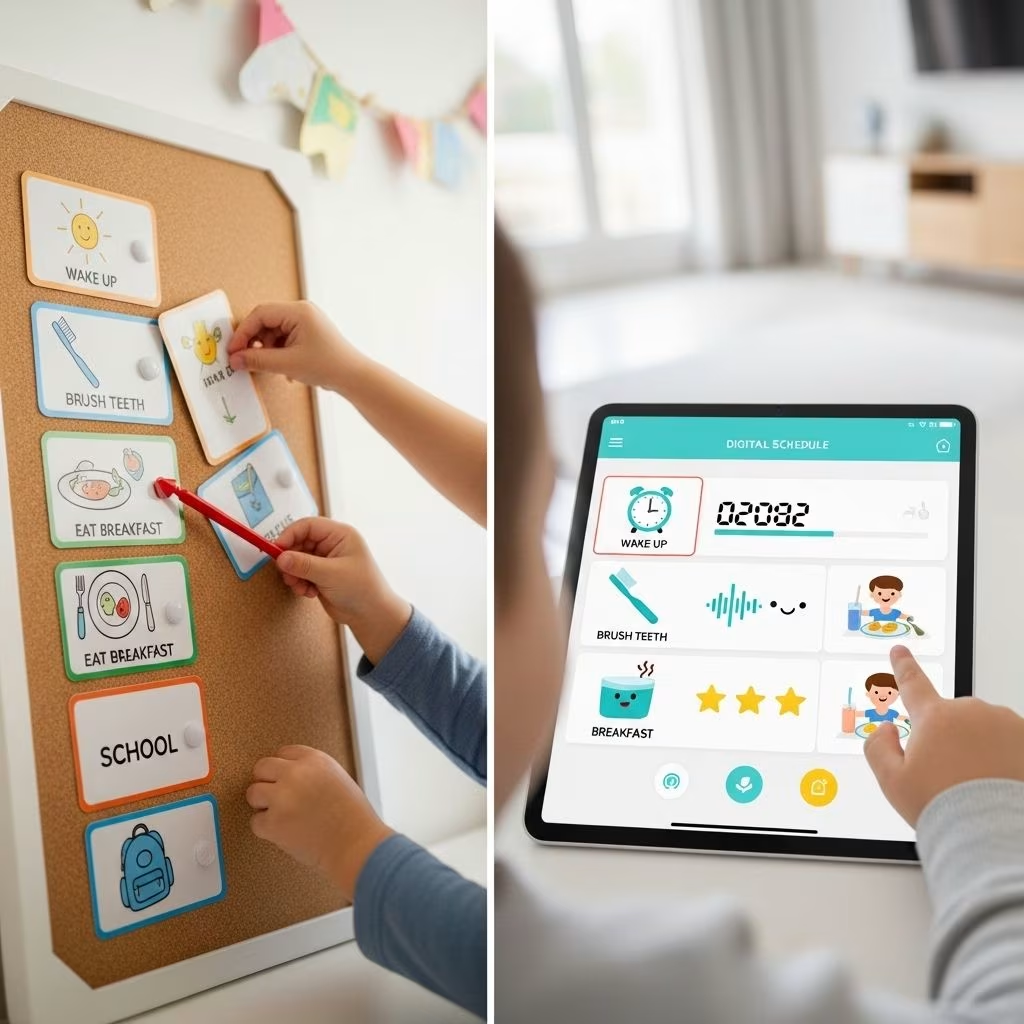
Visual vs Digital Schedules for Young Kids: Comparison
Schedules are essential tools for helping young children—whether in preschool, kindergarten, or special needs settings—navigate their daily routines. Two main types of schedules prevail: visual schedules, often crafted from physical materials, and digital schedules, typically delivered on tablets or computers. This comprehensive guide compares these approaches, discussing their respective strengths, challenges, and the ways families and educators can decide which format fits a child’s unique needs.
Introduction
Most young children thrive with structure. Daily routines—transitions between activities, clear expectations, predictable tasks—allow them to feel confident and calm. For neurodiverse children, such as those with autism spectrum disorder (ASD), schedules can be particularly powerful, increasing independence and lowering anxiety.
Visual and digital schedules represent two proven formats for representing routines. This article compares both, emphasizing real evidence from classroom research and providing practical advice about how to maximize their impact.
What Are Visual and Digital Schedules?
Visual Schedules
Visual schedules use physical items—pictures, icons, words, and sometimes tactile elements—to show children what to expect during their day. They’re commonly crafted from:
- Printed cards or laminated sheets
- Binders with removable picture cards
- Wall charts displaying sequences
- Pocket charts or magnetic boards
Each step or activity is represented visually. For example, a picture of a book symbolizes story time, a swing for recess, a plate for snack time. Visual schedules are often used in early childhood classrooms, therapy rooms, and homes, especially for young children and those with learning or communication differences.
Digital Schedules
Digital schedules use technology such as tablets, smartphones, or computers to display routines and transitions. Common formats include:
- Apps designed for schedule management
- Web-based platforms (Google Slides, custom apps)
- Interactive audio-visual presentations (audio cues, animations)
Digital schedules can incorporate real photographs, sound effects, or even video modeling. They’re especially popular in classrooms with access to digital devices or for families seeking flexible, portable solutions.
Benefits of Visual Schedules
Physical, picture-based schedules have been extensively studied, especially for children with ASD and other developmental disabilities. Key advantages include:
- Accessibility: No technology required; suitable for tech-free environments or for families/schools with limited digital resources.
- Tactile Engagement: Kids can touch, move, or manipulate schedule elements, reinforcing understanding.
- Clear Expectations: Visual sequences reduce ambiguity, supporting transitions between activities.
- Independence: Children learn to follow visual prompts, often reducing reliance on adult verbal cues, thereby building self-management skills.
- Social Acceptance: Can be discreet if designed carefully, though some traditional formats (large binders, wall charts) may feel stigmatizing to certain children.
- Durability: Physical schedules can withstand occasional drops, spills, or rough handling.
Research shows that using visual schedules helps children with ASD and other neurodevelopmental conditions increase activity completion and transition independently, improving confidence in school and at home.
Benefits of Digital Schedules
The rise of tablets and smart devices has enabled new ways to present routines. Notable benefits of digital schedules include:
- Customization and Flexibility: Schedule elements can be quickly rearranged or replaced—no printing, cutting, or laminating required.
- Multimedia Integration: Schedules can feature real photos, animations, audio cues, and instructional videos (such as video modeling), supporting multiple learning styles.
- Portability: Schedules are not limited by physical location; a tablet or phone can accompany the child anywhere, fostering consistency across home, school, and community settings.
- Engagement: Digital devices are often intrinsically motivating to children, increasing their interest in following routines.
- Accessibility Features: Devices can support text-to-speech, zoom, and other tools for children with specific learning needs.
- Data Tracking: Some apps allow monitoring of usage, progress, and adherence, supporting parent/teacher feedback.
Teachers and therapists report the ability to quickly create tailored boards for new situations, leverage real-time pictures, and adapt prompts as needed without the time overhead involved in assembling physical materials.
Challenges and Limitations
| Type | Primary Challenges | Potential Solutions |
|---|---|---|
| Visual (Physical) Schedules |
|
|
| Digital Schedules |
|
|
Both schedule types may require creative adaptations to support individual differences and preferences.
Research Evidence and Real-world Applications
Recent studies have compared binder-based (physical) visual schedules with electronic (iPad-based) schedules for elementary school children, particularly those with ASD. Key findings include:
- Increased Independence: Both formats—visual and digital—helped children complete tasks and transition independently, reducing reliance on repeated verbal prompts.
- Decreased Latency: Children started activities more swiftly after seeing their schedules, compared to when given only verbal instructions.
- Teacher Preferences: Educators in these studies generally preferred digital (iPad) schedules, citing convenience and flexibility.
- Student Preferences: Not all children preferred digital approaches—individual choice is crucial; some liked the tactile engagement of binders, others the multimedia features of tablets.
- Generalization: Children were able to apply schedule-following skills to new activities and settings after learning with either format.
- Social Acceptance and Validity: Teachers rated digital schedules especially high in social validity; interventions with this rating are more likely to be used consistently.
Visual schedules—whether paper or digital—are more effective for supporting transitions than just oral reminders. Building flexibility and honoring child preference improves outcomes.
Choosing the Right Schedule: Factors to Consider
No single schedule format suits all children. Key considerations when choosing between visual (physical) and digital schedules include:
- Age and Tech Literacy: Younger children or those with limited tech experience may adapt better to hands-on physical schedules, while older children or those adept with tablets may prefer digital formats.
- Setting: Tech-free classrooms, outdoor environments, or homes with device limits may favor physical schedules. Digital can be ideal for tech-enabled, adaptive classrooms or travel.
- Individual Preference: Some children prefer manipulating physical objects; others may find interactive screens engaging and intuitive.
- Required Features: Need for audio prompts, animated videos, rapid updates, or data tracking may make digital schedules more suitable.
- Parental/Teacher Management: Consider adults’ comfort with tech setup, maintenance, and management.
- Cost and Accessibility: Physical schedules require materials and assembly; digital requires device access, apps (some paid), reliability.
Where possible, invite children to help choose and design their schedule format. Individualization maximizes motivation and generalization of skills.
Implementation Tips for Parents and Teachers
How to Build a Visual Schedule
- Map your daily routine—think through key transitions and activities.
- Gather images, icons, or photos for each step (snack, play, reading).
- Affix images to cards, charts, or magnetic boards (laminate for durability).
- Allow children to physically move completed activities, reinforcing progress.
- Review and update as routines change—keep extra cards for new activities.
How to Make a Digital Schedule
- Select an app or digital platform (many free options available).
- Upload photographs, icons, and optionally record audio or short video explanations.
- Arrange activities in order and enable easy modification for changing routines.
- If possible, restrict device use to scheduling to prevent distractions.
- Use progress monitoring features—teachers and parents can review data trends.
General Tips
- Model schedule use with children; refer to the schedule consistently during transitions.
- Fade prompts gradually to build independence over time.
- Solicit feedback from children—modify formats to honor their preferences.
- Combine physical and digital schedules if appropriate; hybrid models can leverage strengths of both.
Future Trends in Scheduling for Young Children
Rapid advances in technology and educational neuroscience are driving innovations in schedules for children. Emerging trends include:
- AI-Powered Adaptive Scheduling: Apps that learn child progress and suggest updated visuals and prompts automatically.
- Wearable Schedules: Smart watches or devices providing vibratory cues and timed reminders.
- Augmented Reality (AR): Visual overlays guiding children through routine activities with interactive prompts.
- Integrated Home/Classroom Sync: Schedules syncing across environments for smoother transitions “from home to school to community.”
As research continues, both visual and digital schedules are likely to evolve, with hybrid solutions increasingly common.
Frequently Asked Questions (FAQs)
Q: Are visual schedules only useful for children with autism?
A: No. While visual schedules are critically important for children with ASD, they benefit all young children by promoting routines, supporting transitions, and fostering independence.
Q: Do digital schedules increase screen time concerns?
A: Potentially. However, if device use is limited to schedule viewing and managed well by adults, screen exposure can be minimal and purposeful.
Q: Do children eventually outgrow the need for visual or digital schedules?
A: Many students build sufficient independence to reduce their reliance on schedules, though periodic use may remain helpful, especially during new, complex, or stressful routines.
Q: Can schedules help reduce challenging behaviors?
A: Yes. Predictable routines, clearly represented through visual or digital schedules, can decrease anxiety-driven behaviors and meltdowns in both neurotypical and neurodiverse children.
Q: Should parents use both physical and digital schedules at home?
A: It depends on the child’s age, preferences, and device access. Hybrid approaches can capture the advantages of both formats, but consistency and clarity are key.
Conclusion
Both visual and digital schedules empower young children to manage routines, build independence, and transition successfully through daily activities. While evidence shows both formats are effective—especially for children with learning differences—the best choice depends on the child’s unique needs, the setting, and the available resources. Individual preferences, practical constraints, and the flexibility to update or adapt as routines change remain critical. By thoughtfully selecting, designing, and supporting children with a schedule format that motivates and empowers them, parents and educators can foster calmer, more confident growth—at home and in school.
References
- https://digscholarship.unco.edu/dissertations/583/
- https://digscholarship.unco.edu/cgi/viewcontent.cgi?article=1608&context=dissertations
- https://www.nookly.com/blog/visual-schedules-preschool-kindergarten
- https://www.tandfonline.com/doi/abs/10.1080/15377903.2025.2511608
- https://pmc.ncbi.nlm.nih.gov/articles/PMC7304246/
- https://community.autism.org.uk/f/parents-and-carers/17433/digital-vs-paper-visual-schedules
- https://theautismhelper.com/students-dont-need-visual-schedule-eventually/


